User Guide: A Complete Guide to Understanding and Using Products and Services
A User Guide is one of the most useful resources you can have when learning how to use a product, device, application, website, or service. Whether you have purchased a new electronic device, installed unfamiliar software, or started using an online platform, a clear user guide can save time and prevent unnecessary frustration.
Many people avoid reading instructions because they believe they can figure things out on their own. Sometimes that works, but it can also lead to mistakes, confusion, or even damage to a product. A well-written user guide provides simple instructions and explains important features so users can get the best possible experience.
In this article, we will explore what a user guide is, why it is important, what information it should contain, and how to use one effectively.
What Is a User Guide?
A user guide is a document designed to help people understand and use a particular product, system, application, or service. It normally contains instructions, explanations, tips, warnings, and troubleshooting information.
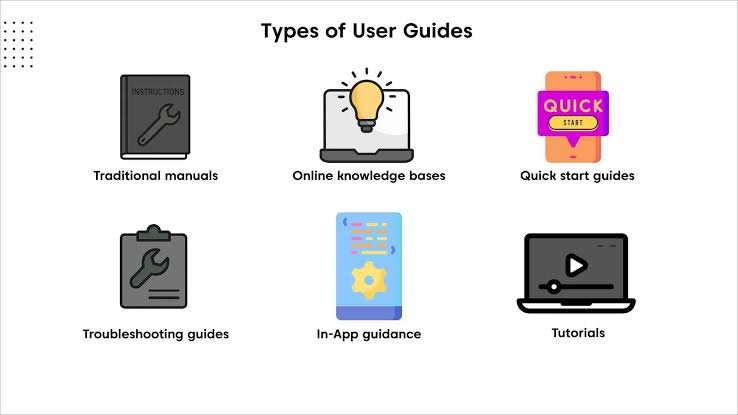
User guides can be available in different formats. Traditionally, companies provided printed manuals with physical products. Today, many user guides are available online as web pages, downloadable documents, knowledge-base articles, or interactive help centers.
The main purpose is simple: to help users accomplish a task without unnecessary difficulty.
For example, if you purchase a new printer, the user guide may explain how to connect it to your computer, install the required software, load paper, replace ink cartridges, and solve common printing problems.
Similarly, a software user guide may explain how to create an account, navigate the interface, change settings, use important features, and resolve common errors.
Why Is a User Guide Important?
A good user guide can make the difference between a smooth experience and a frustrating one. Even products that appear simple can have features that are not immediately obvious.
One major advantage of a user guide is that it helps users learn faster. Instead of experimenting with every button or setting, users can follow clear instructions and understand the correct process.
A user guide can also reduce mistakes. When people use a product without understanding how it works, they may accidentally change important settings or perform an incorrect operation. Instructions provide a safer way to learn.
Another important benefit is troubleshooting. When something goes wrong, users often want an immediate solution. A useful guide can provide step-by-step solutions for common problems, allowing users to fix simple issues without contacting customer support.
For businesses, user guides can also reduce the number of support requests. When customers can find answers independently, support teams have more time to deal with complicated problems.
What Should a Good User Guide Include?
Not every user guide is equally useful. A high-quality guide should be organized, easy to understand, and focused on the needs of the reader.
1. Introduction
The guide should begin with a short introduction explaining what the product or service does and who it is intended for.
This section does not need to be complicated. A few clear paragraphs can give users enough background before they begin.
2. Getting Started Instructions
A getting-started section is especially important for new users. It should explain the basic steps required to begin using the product.
For example, it might cover installation, account creation, setup, activation, or connecting the product to another device.
Instructions should be presented in the correct order so users do not miss an important step.
3. Feature Explanations
Once users understand the basics, they may want to explore additional features. A good user guide should explain the most important functions in straightforward language.
Screenshots, diagrams, examples, and short explanations can make complex features much easier to understand.
4. Safety Information
For physical products, safety information is essential. Users should know about potential risks, warnings, restrictions, and recommended precautions.
Safety instructions should be easy to find and written clearly. Important warnings should never be hidden in complicated technical language.
5. Troubleshooting
A troubleshooting section is one of the most valuable parts of a user guide.
It should address common problems and provide practical solutions. For example:
- The product does not turn on.
- The application is not connecting to the internet.
- A feature is not working correctly.
- The user has forgotten a password.
- An error message appears on the screen.
Solutions should be presented step by step, starting with simple checks before moving to more advanced solutions.
How to Use a User Guide Effectively
Having a user guide is useful, but knowing how to use it properly can save even more time.
First, identify exactly what you are trying to accomplish. Instead of reading the entire guide from beginning to end, look for the section that relates to your specific task.
If the guide includes a table of contents or search function, use it. Digital guides often allow users to search for words related to their problem.
It is also important to follow instructions in order. Skipping steps may cause problems later, especially during installation or setup.
When a guide provides warnings or notes, pay attention to them. These sections often contain information that can prevent mistakes.
If a solution does not work, do not immediately assume the guide is incorrect. Check whether you followed every step correctly and make sure the instructions apply to your specific model, software version, or product configuration.
User Guides for Digital Products
User guides have become especially important as digital products continue to grow.
Applications, websites, online services, and software platforms often contain dozens of features. A new user may not know where to find a particular setting or how different tools work together.
A digital user guide can make this learning process easier by providing tutorials, frequently asked questions, screenshots, videos, and step-by-step instructions.
For software products, guides should also be updated regularly. Applications change over time, and an old guide may contain instructions that no longer match the current interface.
This is why online documentation can be more useful than a printed manual for products that receive frequent updates.
The Difference Between a User Guide and a Manual
The terms “user guide” and “manual” are often used interchangeably, but there can be a slight difference.
A manual is generally a more detailed document that may contain extensive technical information, specifications, maintenance instructions, and reference material.
A user guide is often more focused on helping everyday users accomplish specific tasks.
For example, a technical manual for a machine might contain detailed information about components, maintenance procedures, and technical specifications. A user guide for the same machine may focus mainly on setup, normal operation, and basic troubleshooting.
The exact terminology varies from company to company, so the distinction is not always strict.
Common Mistakes to Avoid When Creating a User Guide
Creating a useful user guide requires more than simply writing down instructions.
One common mistake is using overly technical language. If the target audience is beginners, complicated terminology can make the guide difficult to follow. Technical terms should either be avoided or explained clearly.
Another problem is providing too much information at once. Long paragraphs can make instructions difficult to scan. Short sections, headings, bullet points, and numbered steps usually improve readability.
A lack of visuals can also be a problem. When users need to identify a button, menu, connection, or component, an image can often explain it faster than several paragraphs.
Outdated information is another serious issue. If a product changes but its user guide does not, users may follow instructions that no longer work.
Finally, a guide should not assume that every reader has the same level of knowledge. Good documentation starts with the basics and gradually introduces more advanced information.
How Businesses Can Create Better User Guides
Businesses should create user guides based on real customer needs rather than simply documenting every available feature.
One effective approach is to identify the questions customers ask most often. Those questions can become the foundation of the guide.
Companies can also test their guides with people who are unfamiliar with the product. If a new user cannot complete a task by following the instructions, the guide probably needs improvement.
Clear formatting is equally important. Headings, numbered steps, screenshots, short paragraphs, and highlighted warnings can make a large document much easier to navigate.
It is also useful to provide multiple formats when possible. Some users prefer downloadable documents, while others prefer searchable online help pages or video tutorials.
Frequently Asked Questions
1. What is a User Guide?
A User Guide is a document that provides clear instructions on how to use a product, service, software, device, or application. It usually explains setup, features, basic operations, and solutions to common problems.
2. Why is a User Guide important?
A User Guide helps users understand a product quickly and use it correctly. It can prevent mistakes, save time, explain important features, and provide troubleshooting steps when something goes wrong.
3. What information should a User Guide contain?
A good User Guide should include an introduction, setup instructions, step-by-step procedures, feature explanations, safety information, troubleshooting tips, and answers to common questions. Images or screenshots can also make instructions easier to understand.
4. How can I find a User Guide for a product?
You can usually find a User Guide on the manufacturer’s official website, in the product packaging, or through the product’s online support or help center. Searching for the product name and model number along with “User Guide” can also help you locate the correct document.
5. What makes a User Guide easy to understand?
An effective User Guide uses simple language, clear headings, short paragraphs, numbered steps, and helpful visuals. It should be well organized and written for the intended audience so users can quickly find the information they need.
Final Thoughts
A User Guide is more than a collection of instructions. It is a practical resource that helps people understand a product, use its features correctly, solve common problems, and get more value from their purchase or service.
For users, learning how to find and follow a good guide can save time and reduce frustration. For businesses, creating clear documentation can improve customer satisfaction and reduce the pressure on support teams.
The best user guides are simple, organized, accurate, and written with the reader in mind. They do not assume that users already understand the product. Instead, they explain each important step clearly and provide helpful information when problems occur.
Whether you are using a smartphone, software application, home appliance, online platform, or professional tool, a well-designed user guide can make the learning process much easier. When instructions are clear and accessible, users can spend less time trying to understand how something works and more time actually using it.